Independent Indramat specialistsSan Antonio · Ramos Arizpe

XM / Model group

XM41 product information

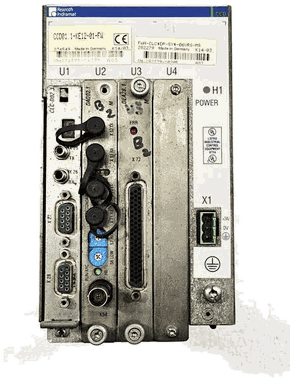
XM41 is documented within IndraControl XM Embedded Controls. Official Bosch Rexroth portfolio documentation identifies this control family in the cited catalog. Full type code, hardware revision, firmware and system compatibility must be verified.

Call for availability

Catalog reference — call to check stock

XM41 overview

XM41 belongs to the IndraControl XM Embedded Controls platform. XM41 is documented within IndraControl XM Embedded Controls. Official Bosch Rexroth portfolio documentation identifies this control family in the cited catalog. Full type code, hardware revision, firmware and system compatibility must be verified.

Official Bosch Rexroth portfolio documentation identifies this control family in the cited catalog. Full type code, hardware revision, firmware and system compatibility must be verified.

The base model identifies a useful frame or product group, but it is not enough by itself to select a replacement. Electrical design, feedback, mechanical interface, brake, cooling, firmware and installed options can all change inside one model group.

Send the full nameplate plus photos of the unit and connections. Litco can route the request toward a verified inventory check, repair evaluation, exchange or a technical follow-up.

Manufacturer document trail

Bosch Rexroth Electric Drives & Controls GoTo Catalog

Official product overview for documented control, HMI, I/O, IPC and drive-system hardware.

Use the source to establish the product context, then verify the complete XM41 nameplate, material number, revision and installed system before selecting hardware.

View manufacturer reference →

Configuration checkpoints

Product groupControl or terminal family
HardwareComplete type and material number
RevisionHardware revision and option modules
SoftwareFirmware and application version
InterfacesNetwork, I/O and feedback ports
Retained dataStorage media, parameters and project backup
System contextMachine, drives and connected hardware

Repair, testing and exchange

Use one intake for a repair evaluation, exchange request or replacement search. Describe the failure, capture any display or drive fault, identify the machine and axis, and preserve parameters or application data before removing control hardware.

Other XM model groups

Use the exact model characters on the label. Neighboring groups can use different frames, power classes, interfaces or mechanical packages.

XM41 questions

Identify first. Quote the exact configuration.

Is XM41 enough to select a replacement?

No. XM41 identifies the model group, while the remaining type-code fields can change electrical, feedback, mechanical, firmware and option compatibility. Match the complete nameplate.

Does an inventory record mean XM41 is in stock today?

No. A record confirms that the designation exists in Litco data, not that a specific unit is physically available now. Litco checks the complete code, quantity, condition and included hardware before quoting.

What should I send for a XM41 stock or repair check?

Send a straight-on nameplate photo, the complete type code and material number, full-unit and connector photos, plus the machine, axis and fault or commercial request.

Availability · repair · exchange

Send the complete code.

The suffix can change electrical and mechanical compatibility. Include every character and a clear nameplate photo.