
How do I identify the correct HVE unit?
Use the complete type code, material number and revision from the nameplate. Clear photos of the label, full unit and connections help verify the configuration.
Power Supplies & Line Modules / Product family
DIAX04 supply units matched by line voltage, DC-bus architecture, auxiliary modules and connected drives.
Inventory record · verify stock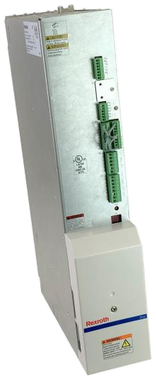
Model groups
These complete designations have detailed product pages. Select a code to compare its configuration, then request verification of current stock and condition.
Manufacturer document trail
Reference for HVE and HVR supply architecture, dimensions, mains connection and DC-bus control.
Use the document reference to check product-family context and edition availability. The physical nameplate, material number, revision and installed machine still govern any stock, repair or compatibility decision.
View manufacturer reference →Use these decision pages to compare related hardware and preserve the surrounding machine configuration.
Technical references / HVE
Find related diagnostic indexes and troubleshooting references. Check the firmware and document edition; a family match alone does not confirm applicability.
Common questions
Use the complete type code, material number and revision from the nameplate. Clear photos of the label, full unit and connections help verify the configuration.
An inventory-match status means Litco records contain this family. Call or submit the complete code so current stock, condition and the exact unit can be verified.
The same intake can be routed for repair evaluation, exchange or replacement. Include the machine, fault symptoms and complete hardware configuration.
Availability · repair · exchange
The suffix can change electrical and mechanical compatibility. Include every character and a clear nameplate photo.