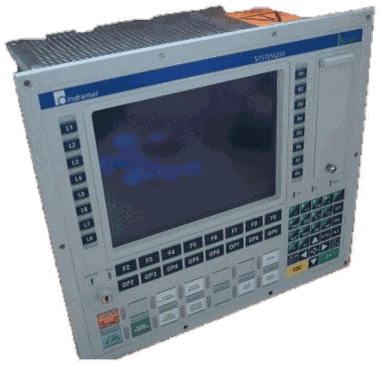
BTV20.3SA-24B-55C-S-FW product details
The BTV20.3SA-24B-55C-S-FW is a recorded designation in the Indramat BTV family. Match every character and the installed configuration before ordering or substituting.
Control sections and operator panels can differ in hardware generation, communication and I/O options, safety hardware, firmware, storage and machine application. Verify the complete label and installed options.
Historical inventory reference
| Exact designation | BTV20.3SA-24B-55C-S-FW |
|---|
| Family | BTV |
|---|
| Model group | BTV20 |
|---|
| Product type | BTV Operator Terminals |
|---|
| Quantity | No current quantity is published for this catalog record. Request a current stock check. |
|---|
| Current price & condition | Confirmed with your quote |
|---|
The quantity snapshot, photo reference and photo review can have different dates. None confirms today’s physical stock, test status, firmware or included accessories.
BTV20 operator-terminal identification notes
BTV20.3 is a PC-based machine operator panel for NC/PLC systems. The visible panel alone does not identify the installed computer, control cards, software or application image.
| Function code | Identifies MTA, MTC, PC or ISP configuration |
|---|
| Other fields | Keyboard, RAM, machine-function keys, system configuration and supply |
|---|
| Storage/software | Disk or smart-card option and firmware/software must be preserved |
|---|
| Installed cards | ISA, PCI and PC104 modules can be configuration-specific |
|---|
Compatibility checkpoint: Match function type, installed cards and slot order, firmware/software, storage and the operating-system/application image.
These are identification notes for the documented model or generation. Option lists describe the manual scope; they do not decode every field of this exact unit or confirm an interchangeable replacement.
View manual reference: BTV20.3 - Project Planning Manual →Check a manual against your nameplate and firmware →
Photos help confirm the match
Start with the complete control or panel label and full unit. Add communication and I/O connectors, option-card labels and slot positions, storage and software labels where accessible. Record the machine application and available backup details; avoid sharing passwords or other access credentials.
Full nameplate and photo checklist →Repair and testing
Send the machine builder, model, axis, fault history and photos of the label and installed interfaces. Litco reviews the unit before confirming repairability, testing, timing and terms.
Other family records—not confirmed substitutes
These records may share a model or family, but only a complete configuration review can establish compatibility.