
Bottom line
What this comparison can establish
A matching DDS basic unit is not automatically a matching configured drive. Preserve the module stack, firmware and parameter context.
DIAX03 system guide / more than a base unit
A DDS request often begins with the basic-unit label, but the operating drive can include command and plug-in modules, a software module, firmware and machine parameters. Those items must be recorded in position before hardware is separated.
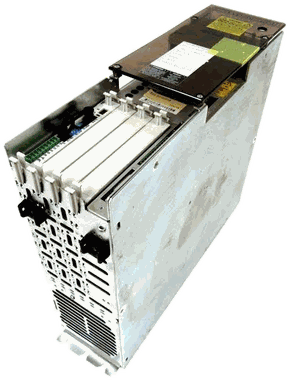
Bottom line
A matching DDS basic unit is not automatically a matching configured drive. Preserve the module stack, firmware and parameter context.
Side-by-side identity
Decision path
Capture: Photograph the complete DDS02 or DDS03 basic-unit label.
Then: Verify design, cooling, current and feedback fields.
Capture: Photograph every module and software label before removal.
Then: Build a slot-by-slot configuration record.
Capture: Locate firmware records, parameters, backups and the connected motor.
Then: Define the preservation and startup plan before replacement.
Official manufacturer records
Verified downloads open on the manufacturer’s site. Other references open a library entry with assistance options. Confirm the applicable edition, physical nameplate and machine documentation.
Common questions
Usually not. The operating configuration can depend on command, plug-in and software modules, firmware, parameters, motor and supply.
Document the complete installed assembly first, then confirm the requested evaluation or replacement scope before shipping anything.
Slot position is part of the evidence needed to reconstruct and compare the configured drive.
Availability · repair · offers
The suffix can change electrical and mechanical compatibility. Include every character and a clear nameplate photo.