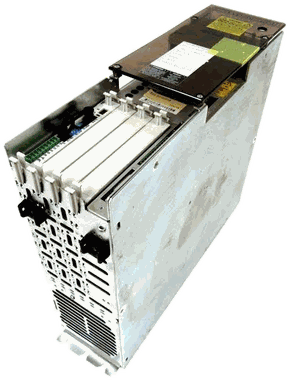
DDS02.2-W015-B product details
The DDS02.2-W015-B is a recorded designation in the Indramat DDS family. Match every character and the installed configuration before ordering or substituting.
Units that share a base model can differ in power, feedback, command interface, firmware, brake, shaft, cooling or installed modules.
Historical inventory reference · 2026-08-22
| Exact designation | DDS02.2-W015-B |
|---|
| Family | DDS |
|---|
| Model group | DDS02 |
|---|
| Product type | Digital drive controller |
|---|
| Quantity in the historical snapshot | 8 · not a current stock count |
|---|
| Quantity snapshot date | 2026-08-22 |
|---|
| Current price & condition | Confirmed with your quote |
|---|
The quantity snapshot, photo reference and photo review can have different dates. None confirms today’s physical stock, test status, firmware or included accessories.
DDS02 manual-backed identification notes
DDS02 is a configurable digital drive-controller basic unit. Plug-in modules and a separate software module containing firmware and drive parameters form part of the installed configuration.
| Cooling code | W, K or F, depending on the documented version |
|---|
| Current codes | 015, 025, 050, 100 and 150 A |
|---|
| Feedback code | Digital or resolver motor feedback |
|---|
| Configuration | Basic unit plus command/plug-in modules |
|---|
| Software module | Carries firmware and drive parameters |
|---|
| Motor matching | Controller and motor feedback codes must agree |
|---|
Compatibility checkpoint: A bare DDS basic unit is not a complete configured replacement. Cooling, current, modules, feedback, software module, firmware and function ID/version all matter.
View manual reference: DIAX03 DDS02.2 / DDS03.2 Drive Controller Basic Unit →Photos help confirm the match
A straight-on nameplate image is the most useful first view. Add the full unit, connectors or option modules, and the shaft, flange or rear interface when requesting a stock check or repair review.
Repair and testing
Send the machine builder, model, axis, fault history and photos of the label and installed interfaces. Litco reviews the unit before confirming repairability, testing, timing and terms.
Configuration guides for this product family
These pages explain the system evidence that still matters after an exact inventory record is found.
Other family records—not confirmed substitutes
These records may share a model or family, but only a complete configuration review can establish compatibility.